


The push to democratize security data often hits a hard reality: more eyes on a security management platform shouldn’t mean more hands on the steering wheel. As we move from “finding” to “fixing,” the circle of stakeholders naturally expands. But opening a mission-critical platform without a granular permissions model creates a new kind of risk.
To counter this risk and make managing your Nagomi instance more secure, we’ve recently introduced Role-Based Access Control (RBAC). RBAC is a foundational control customers and prospects have come to expect, and so we’re happy to say that this update will help you scale your program while keeping high-impact configurations in the right hands.
The Strategic Importance of RBAC for Security Operations and Governance
Exposure management sits at the intersection of risk data and security controls. It is a powerful vantage point, but it’s also sensitive. Up until now, teams faced a binary choice: limit access to protect integrity, or grant broad access and risk accidental modifications to critical integrations.
RBAC resolves this tension. It allows you to move away from “all-or-nothing” access, ensuring that analysts and operators have the agility to work, leaders have the data to decide, and admins have peace of mind that the core configuration is secure.
Defining the Three Built-In User Roles: Read-Only, Analyst, and Admin
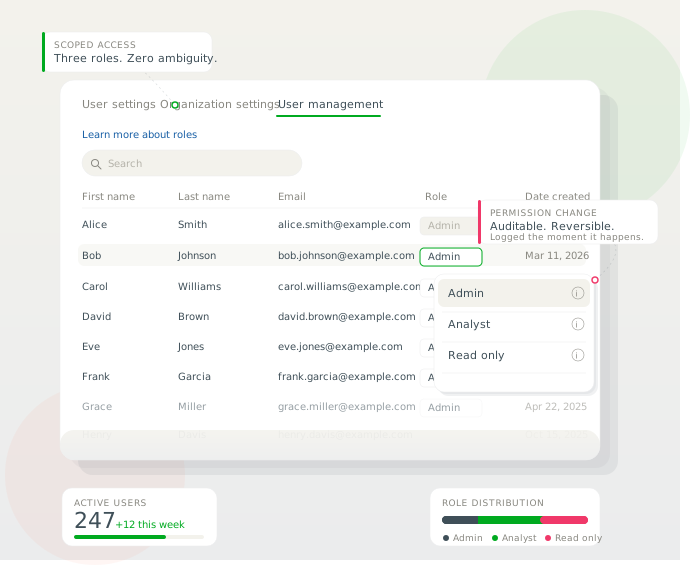
We’ve built this first iteration of RBAC around three distinct roles that map to how modern security teams actually function:
- Read-Only: Suited for executives or auditors. It provides full visibility into risk posture and reports but does not allow the user to change data or settings. It’s situational awareness without the operational risk.
- Analyst: The practitioner role. Analysts can manage tickets, create exclusions, and act on AI-driven recommendations. It’s the tools needed for triage without access to underlying platform settings.
- Admin: Reserved for platform owners. Admins maintain full control over integrations, detection rules, and user management. It’s flexibility with added security control.
Seamless Rollout and Secure Default Permission Logic
We’ve designed this rollout to be seamless for your current workflow:
- Continuous Access: All existing users default to Admin status to ensure zero disruption.
- Secure by Default: All new users default to Read-Only, ensuring access is an intentional grant rather than an accidental privilege.
- Audit-Ready: Every role change is captured in Nagomi’s audit logs for compliance and internal governance.
Multi-Tenant Governance and Parent-Child Organization Role Inheritance
Exposure management rarely operates within a single, uniform environment. Most organizations span business units, subsidiaries, and acquisitions, each with its own infrastructure and constraints.
Nagomi’s multi-tenant governance reflects that reality.
The release of multi-tenant governance unifies visibility across environments without the need for standardization at tooling or configuration levels. Each tenant in the operator’s environment is logically isolated to preserve data boundaries, which conforms to privacy and regulatory requirements. This approach also gives users a consolidated view of organizational risk, which simplifies visibility and understanding to aid strategic exposure management.
Further, with this feature, business units map automatically through existing infrastructure tags, which reduces manual setup and creates a consistent view of exposure across environments.
The enhanced parent-child organization model extends this structure.
Roles and permissions can be defined at the parent level and inherited by child organizations where appropriate. Teams can also manage access locally, if desired. This functionality supports centralized governance without removing flexibility, so global teams maintain oversight while individual units may manage their own remediation priorities.
Operational Benefits: Efficiency, Security, and Scalability
The addition of RBAC isn’t just a new settings tab; it’s an operational enabler. It allows you to:
- Reduce internal risk: Limit the “blast radius” of accidental configuration changes.
- Empower the SOC: Give analysts the specific tools they need to move fast on remediation.
- Drive executive alignment: Provide leadership with metrics in a safe, view-only environment.
We’re committed to building the controls you need to run a mature exposure management program at scale.
Ready to configure your team? Admins can begin updating roles immediately via the User Management tab in Settings. Schedule a your exposure review today!