


Introducing Asset Relationships in Nagomi
Asset visibility is the cybersecurity equivalent of a high social media follower count: it’s a vanity metric that looks impressive in a slide deck, but it pays zero dividends to effective exposure management. For instance, a list of 50,000 hostnames provides no sense of priority or direction. It tells the analyst that lots of hardware exists, but it stays silent on substantive questions: How does each piece of hardware, in isolation or combination, impact the organization if exploited? What is the likelihood of a particular asset’s compromise? Do compensating controls exist that will mitigate the potential of a successful attack against this device?
To help the organization effectively manage exposures, these answers need to be readily available and credible, despite architectural challenges.
For too long, security analysts have had to perform “swivel-chair” correlations, manually moving between identity providers, CMDBs, and endpoint managers to determine device ownership and permissions. That said, building these relationships directly into the data layer removes the mandate for manual correlation and allows teams to focus instead on high-impact risk reduction.
This is why Nagomi is introducing Asset Relationships, not a novel concept, necessarily, but one that elevates SecOps teams from vulnerability identification to strategic threat exposure management.
Relational Context in Exposure Management
The real problem in security isn’t that we lack data; it’s that the data is antisocial. It sits in silos, refusing to talk to other tools. Teams may have identity records in Entra ID, device health in Intune, and ownership logs in ServiceNow. When an alert hits, the detective work begins—manual work that’s tedious and causes analyst burnout. The good news? This annual work is now entirely unnecessary.
This initial release of Asset Relationships is about ending the manual “correlation tax.” By establishing a direct link between Users and Devices, Nagomi is giving users a unified view that actually reflects the reality of their environments. No more hunting for a needle in three (or more) different haystacks.
A Data Pipeline for User-to-Device Mapping
Nagomi has built a robust architecture that handles the complexity of organizations’ stacks so humans don’t have to. Our model follows a few “golden rules” to ensure the data stays clean:
- Correlated Logic: Nagomi connects data from individual tools and presents it as a single asset view. If multiple tools report the same laptop, users see one unified asset instead of separate entries.
- Bi-Directional Visibility: While relationships (like “owns” or “logged into”) are directional, Nagomi reflects them on both sides. Analysts can view a user to see their associated devices, or look at a device to see its associated users.
New UI Components: Asset Drawer Widgets and Inventory Columns
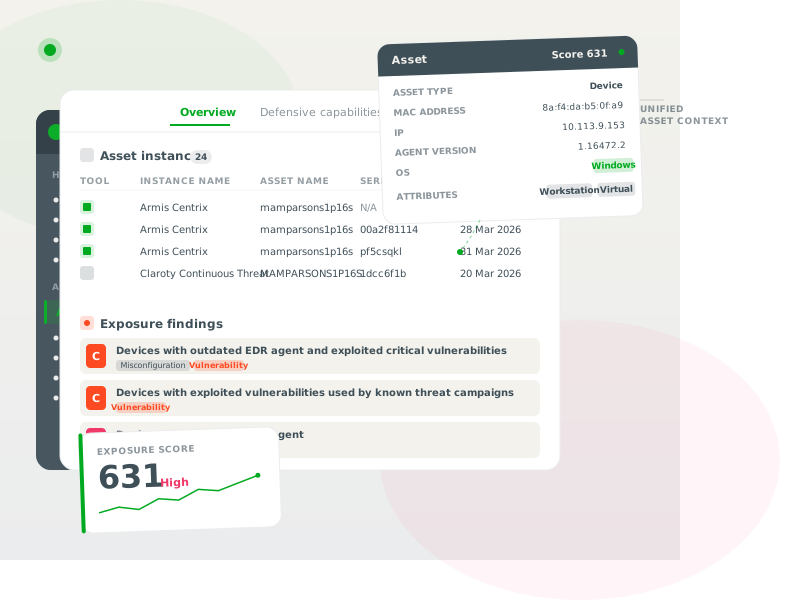
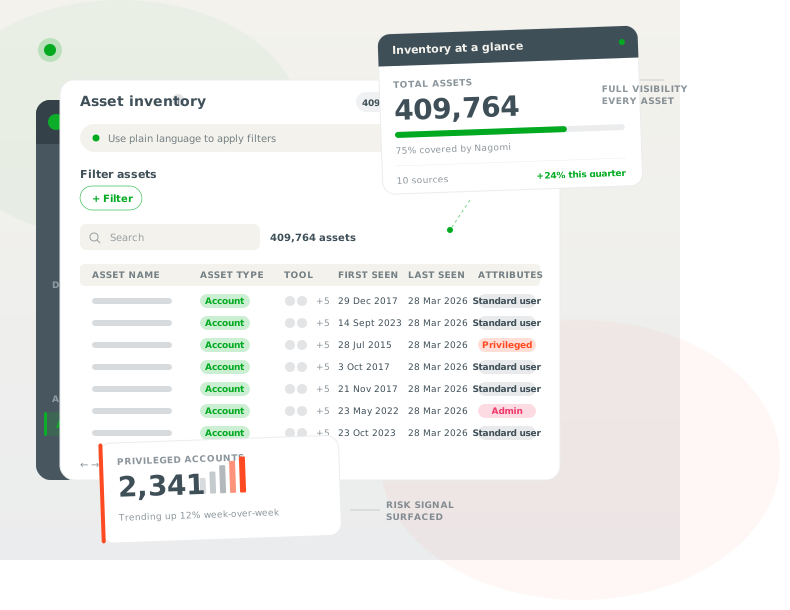
We’ve added some much-needed “glue” to the interface to make this data immediately actionable. Our customers now have access to Widgets and Inventory columns (The “Quick Look”):
Click into an asset to find new widgets that display Associated Users (for devices) or Associated Devices (for users).
- Consolidated Details: Each row shows the source tool and aggregated metadata like “Last Login” or “Local Admin” status.
- Smart Merging: If multiple tools provide the same info (like a login timestamp), Nagomi intelligently displays the most recent one so users aren’t digging through duplicates.
Advanced Query Capabilities: Filtering Assets by Related Properties
Visibility in the drawer is a win for a single investigation, but the real power lies in the Asset Inventory. This is where Nagomi moves beyond a simple catalog and becomes an engine for strategic decision-making. The Related Asset filter allows customers to cross-reference data from disparate silos—identity, device, and network—to answer the questions that actually matter to the business.
When filtering by a related property, it;s no longer necessary to chase a phantom host; specific risk can be addressed using an associated name, a role, and a department attached to it.
The Related Asset filter enables teams to move beyond a simple “search” and start a “solve” with these outcome-oriented workflows:
The “Technical Debt” Hunt
- Workflow: Identify every user assigned a device with an end-of-life operating system (e.g., Windows 10).
- Benefit: This ends the friction and guesswork of IT refresh cycles. Send a verified list of assets to the procurement team to ensure budget is allocated to the highest-risk machines first. Eliminate unnecessary assets and get a smaller attack surface without a manual audit.
The “Privileged Risk” View
- Workflow: Isolate devices owned by members of the “Domain Admin” group that have high-severity vulnerabilities.
- Benefit: This is the ultimate tool for prioritization. A “Critical” flaw on a guest laptop is a nuisance; a “High” on a Domain Admin’s workstation is an emergency. This filter ensures Tier-3 analysts spend their time on the gaps that lead to full-scale domain compromise. It turns a flood of alerts into a prioritized hit list.
The “Shadow IT” and Control Gap Recon
- Workflow: Find users with active sessions in Netskope who own a device not enrolled in Intune.
- Benefit: This exposes the hidden gaps in defense by identifying managed identities on unmanaged machines—the classic recipe for data exfiltration. Operators can now close these gaps before they become breach notifications, all without a single manual cross-check between the security console and your MDM.
For SecOps teams, the primary benefit is operational leverage. The aggravating churn of “patch for the sake of patch” is eliminated by a surgical approach to exposure management.
By filtering for relational context, teams gain:
- Reduced Friction: Provide IT and DevOps with evidence-backed lists that they can’t ignore.
- Capacity Recovery: Reclaim hours of manual correlation time for senior analysts.
- Executive Clarity: Translate technical debt into business risk that a board of directors can understand.
This isn’t just a filter; it’s a way to ensure limited resources always focus on the exposures with the largest potential impact on the mission.
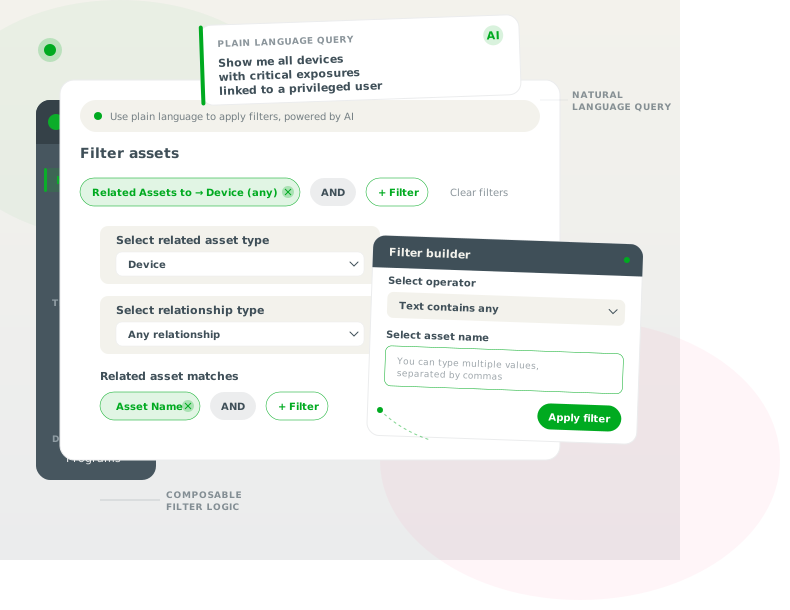
By filtering assets based on the properties of related assets, admins can prioritize remediation based on actual business risk rather than a dubious CVSS score.
Nagomi as the Hub for Context-First Security
Ultimately, adding asset relationships is about more than just a new widget in a drawer—it’s about completing the circuit. Nagomi was built to bridge the gap between what organizations’ security tools see and what they actually do. By layering identity context over infrastructure data, we’re moving from a technical view of vulnerabilities to a business view of risk.
The Asset Relationship upgrade in Nagomi enhances the platform by providing the essential connective tissue between people and assets, turning Nagomi into a cohesive “operating system” for SecOps stacks.
Ready to see your environment in a new light?
Existing customers can explore Asset Relationships today by visiting the Asset Inventory or clicking into any User or Device drawer. If you’re ready to stop “swivel-chair” investigations and start focusing on outcomes, schedule a technical deep dive.